
Undermount Sink Reveal: Positive, Zero, or Negative?

Kitchen planning · Countertop decisions
Undermount Sink Reveal: Positive, Zero, or Negative?
An undermount sink reveal describes where the countertop edge sits relative to the inside edge of the basin. A positive reveal exposes part of the sink rim, a zero reveal aligns the counter edge with the bowl, and a negative reveal lets the counter project over it. The right choice depends on the exact sink, countertop, and accessories—not appearance alone.
Decide before the countertop is cut
Ask your fabricator which reveal options the selected sink supports. Approve the edge position on a drawing, and check that fitted accessories can still sit, slide, and lift out as intended.
Use the pre-cutting checklistPositive, Zero, and Negative Reveal Compared
These terms describe the horizontal relationship at the bowl opening. They do not describe the depth of the sink or how far it hangs below the counter. Confirm the terminology with your fabricator, especially if their drawing uses “flush” for more than one installation detail.
| Reveal type | What you see from above | What to discuss |
|---|---|---|
| Positive | A visible strip of sink rim inside the counter opening | Appearance, accessible rim cleaning, and accessory clearance |
| Zero | Counter edge aligns with the inside bowl edge | How the alignment follows corners and the actual basin shape |
| Negative | The countertop overhangs the inside bowl edge | Access beneath the edge and possible interference with ledges |
Positive Reveal: A Visible Sink Edge
With a positive reveal, some of the sink's upper rim remains visible. Decide whether you like that border with your chosen sink finish and countertop. Ask to see a sample or a clearly marked drawing rather than judging the detail from a distant kitchen photograph.
Include the exposed rim in your cleaning routine. A visible strip is still a surface that needs care; it does not eliminate the joint between sink and counter. Use the product's cleaning instructions for both materials.
Zero Reveal: An Aligned Opening
A zero reveal aims to line up the countertop edge with the inside edge of the basin. It can suit someone who wants a visually continuous opening without an intentional exposed border or overhang.
Discuss how the fabricator will achieve that alignment around the corners. Nominal product dimensions do not show every curve or transition. Have the actual sink and its approved installation information available before the final fabrication decision.
Negative Reveal: A Countertop Overhang
A negative reveal places the countertop edge over part of the basin opening. Consider how you will reach the underside of that overhang for cleaning. Ask the fabricator to show the edge profile and joint location in a sample or section drawing.
Do not choose an overhang simply because it hides more of the rim. If the sink has a fitted accessory system, the counter may occupy space the accessories need. Compatibility is a separate requirement from the look you prefer.
Does Zero Reveal Mean a Flush-Mount Sink?
No. In this article, zero reveal refers to alignment at the opening of an undermount installation. A flush-mount installation concerns the relationship between the top of a sink rim and the countertop surface. The two descriptions address different details.
If you are still comparing mounting methods, read the Lordear guide to drop-in, undermount, and flush-mount sinks. Choose the mounting method first, then resolve the appropriate reveal for the exact undermount model.
Why Workstation Sinks Need an Extra Check
Workstation sinks use ledges to support fitted items such as boards or colanders. The countertop opening and edge profile must leave the necessary working space available. Do not assume every reveal option suits every workstation design.
As a manufacturer-specific example, Kraus advises positive or flush reveal for one of its workstation models because negative reveal would cover the accessory ledge. That example explains why the question matters; it is not a reveal specification for a Lordear sink.
Check Movement, Not Just Whether an Accessory Fits
Ask whether the accessory can sit on its intended supports, move through its intended travel, and lift out without catching the counter. Consider the edge treatment as well as the opening. A drawing showing only the overall cutout may leave this practical detail unresolved.
For example, a homeowner may prefer an overhang in a photograph but also want to slide a fitted board along the sink. Before committing, the homeowner and fabricator should check the proposed opening against that model's accessory system. This is a planning example, not a report of a tested installation.
A Checklist Before You Approve the Cutout
- Identify the exact sink. Record the model and selected variant, not just its nominal width.
- Get the correct installation documents. Confirm which reveal options and template apply to that model.
- Review a drawing. Mark the intended edge position and clarify the meaning of any “flush” label.
- Confirm the countertop requirements. Have the fabricator assess material, edge treatment, support, and clearances.
- Check fitted accessories. Resolve ledge access, movement, and removal before cutting.
- Keep the approved information together. Save the sink details, drawing, and any manufacturer clarification for the installer.
A template is an input to the installation process, not a reason to skip model checks. If the supplied template shows one reveal but you want another, obtain guidance rather than adding a generic offset yourself. This article does not prescribe a universal reveal measurement.
Replacing a sink in an existing countertop?
The current opening limits your options. Ask the fabricator to assess the actual opening and proposed replacement before ordering. A different reveal may require countertop work and cannot be promised from the product title alone.
Ask about your selected sink modelA Lordear Workstation Model to Review
The Lordear 32-inch undermount workstation sink, model LH-USo3219r10R1d, is listed with a single-tier accessory track and stainless steel construction. Its page lists exterior dimensions of 32 × 19 × 10 inches and a minimum cabinet width of 35 inches.
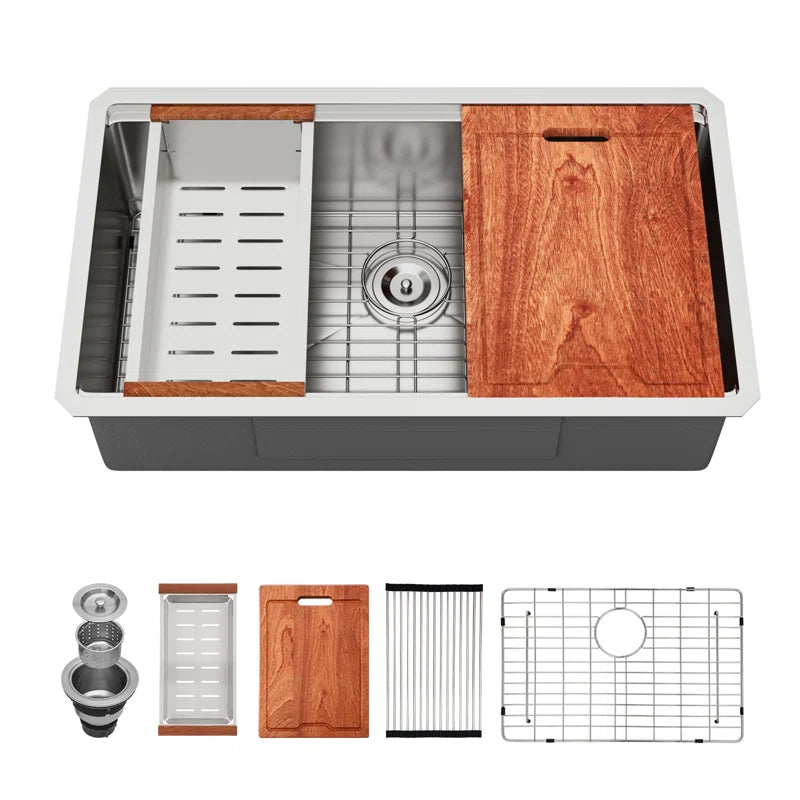
Those dimensions help identify the model, but they do not specify your preferred reveal or establish the cutout. Ask Lordear and your fabricator to confirm the appropriate installation arrangement and accessory clearance. Check current availability before planning a purchase; the page showed a sold-out notice during this review.
Compare alternatives in the undermount sink collection. For a vanity project, start with the bathroom undermount collection and use the selected basin's own installation guidance. Kitchen workstation recommendations should not be transferred automatically to a ceramic bathroom basin.
Frequently Asked Questions
Which undermount reveal is best?
There is no universal winner. Start with the options supported by the sink and countertop, then compare the appearance, cleaning access, and accessory requirements with your fabricator.
Is zero reveal the same as zero maintenance?
No. Alignment does not remove the joint or the need for cleaning and maintenance. Follow the care instructions for the sink, countertop, and installed joint.
Can I change the reveal after installation?
That depends on the existing cutout, countertop, and sink arrangement. Have the fabricator assess the project before assuming an adjustment is possible without replacing or altering the counter.
Does a workstation sink allow negative reveal?
Do not assume it does. Ask about the exact model and its ledges. A counter overhang can interfere with fitted accessories, so obtain confirmation before fabrication.
Choose the Reveal Before Fabrication
Compare positive, zero, and negative reveal using the actual sink, the countertop plan, and the accessories you will use. Save the approved details and resolve questions before the opening is cut. If you have shortlisted a Lordear model, request its installation guidance as your next step.